<PCA>ping 100.2.2.3 Ping 100.2.2.3 (192.168.2.10): 56 data bytes, press CTRL_C to break 56 bytes from 100.2.2.3: icmp_seq=0 ttl=254 time=22.000 ms 56 bytes from 100.2.2.3: icmp_seq=1 ttl=254 time=51.000 ms 56 bytes from 100.2.2.3: icmp_seq=2 ttl=254 time=21.000 ms 56 bytes from 100.2.2.3: icmp_seq=3 ttl=254 time=43.000 ms 56 bytes from 100.2.2.3: icmp_seq=4 ttl=254 time=34.000 ms
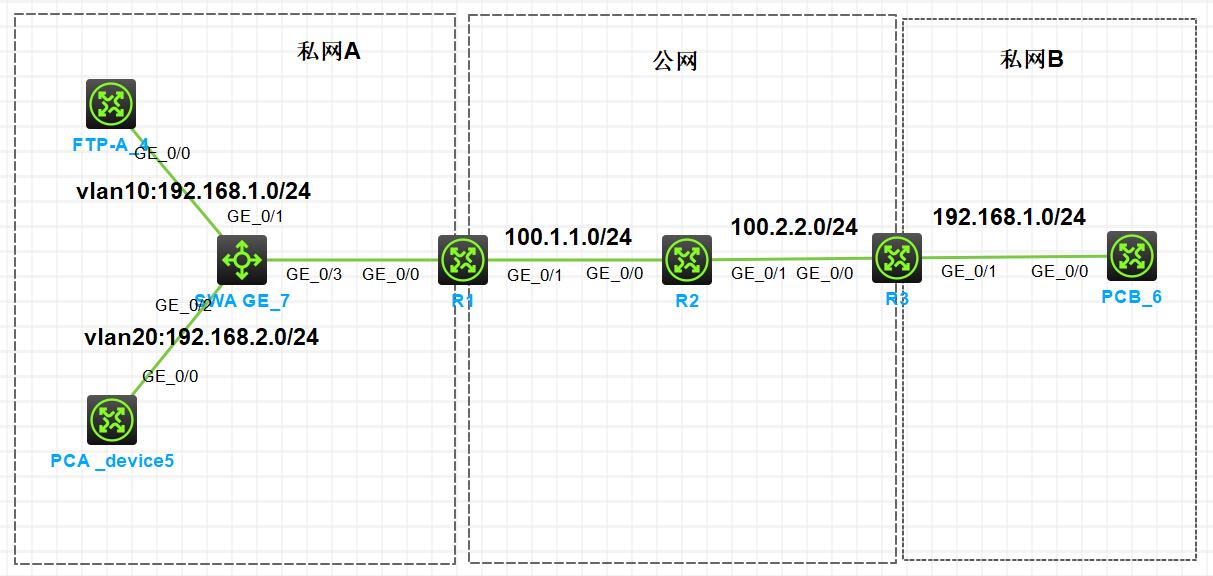
5.私网 B 通过在 R3 上配置 EASY IP 访问互联网
分析:根据需求得知,ACL 需要配置允许 192.168.1.0/24 网段;使用 EASY IP,就无需配置 NAT 地址池,直接在公网接口上配置即可,EASY IP 会自动识别公网接口的 IP 地址
<PCB>ping 100.1.1.1 Ping 100.1.1.1 (192.168.1.10): 56 data bytes, press CTRL_C to break 56 bytes from 100.1.1.1: icmp_seq=0 ttl=254 time=32.000 ms 56 bytes from 100.1.1.1: icmp_seq=1 ttl=254 time=29.000 ms 56 bytes from 100.1.1.1: icmp_seq=2 ttl=254 time=41.000 ms 56 bytes from 100.1.1.1: icmp_seq=3 ttl=254 time=33.000 ms 56 bytes from 100.1.1.1: icmp_seq=4 ttl=254 time=34.000 ms
6.私网 A 配置 NAT SERVER 把 FTPA 的 FTP 服务发布到公网,使 PCB 可以访问
[FTP]ftp server enable [FTP]local-user zhangdaye New local user added. [FTP-luser-manage-zhangdaye]pass sim 123456789. [FTP-luser-manage-zhangdaye]service-type ftp [FTP-luser-manage-zhangdaye]authorization-attribute user-role level-15
步骤 1:在 R1 的公网接口上配置 NAT SERVER,映射端口 20 和 21
1
[R1-GigabitEthernet0/1]nat server protocol tcp global current-interface 20 21 inside 192.168.1.1 20 21
步骤 2:在 PCB 上测试是否能够通过 R1 的公网地址访问 FTPA 的 FTP 服务
1 2 3 4 5
<PCB>ftp 100.1.1.1
Press CTRL+C to abort.
Connected to 100.1.1.1 (100.1.1.1).
220 FTP service ready.
User (100.1.1.1:(none)):