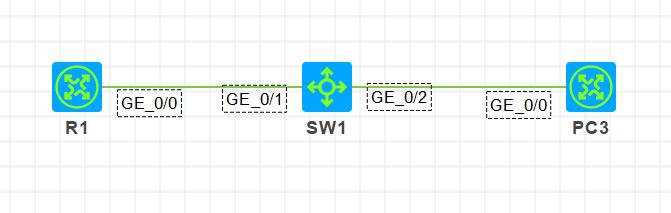
[R1]display ipv6 interface g0/0 GigabitEthernet0/0 current state: UP Line protocol current state: UP IPv6 is enabled, link-local address is FE80::7C9F:E8FF:FE51:105 No global unicast address configured ……
步骤3:PC3上开启IPv6链路本地地址自动生成和查看地址命令和R1一致,此处省略
步骤4:在PC3上Ping R1的IPv6链路本地地址,发现可以Ping通
注意:在路由器上Ping ipv6链路本地地址,需要指定出接口
1 2 3 4 5 6 7
[PC3]ping ipv6 -i g0/0 FE80::7C9F:E8FF:FE51:105 Ping6(56 data bytes) FE80::824C:A1FF:FE05:305 --> FE80::7C9F:E8FF:FE51:105, press CTRL_C to break 56 bytes from FE80::7C9F:E8FF:FE51:105, icmp_seq=0 hlim=64 time=160.000 ms 56 bytes from FE80::7C9F:E8FF:FE51:105, icmp_seq=1 hlim=64 time=29.000 ms 56 bytes from FE80::7C9F:E8FF:FE51:105, icmp_seq=2 hlim=64 time=80.000 ms 56 bytes from FE80::7C9F:E8FF:FE51:105, icmp_seq=3 hlim=64 time=39.000 ms 56 bytes from FE80::7C9F:E8FF:FE51:105, icmp_seq=4 hlim=64 time=20.000 ms
[R1]interface g0/0 [R1-GigabitEthernet0/0]ipv6 address 2001::1 64 [R1-GigabitEthernet0/0]undo ipv6 nd ra halt
步骤2:在PC3上查看结果
1
2
3
4
5
6
[PC3]display ipv6 interface g0/0
GigabitEthernet0/0 current state: UP
Line protocol current state: UP
IPv6 is enabled, link-local address is FE80::824C:A1FF:FE05:305
 Global unicast address(es):
  2001::824C:A1FF:FE05:305, subnet is 2001::/64 [AUTOCFG]
[PC3]Ping ipv6 2001::1
Ping6(56 data bytes) 2001::824C:A1FF:FE05:305 --> 2001::1, press CTRL_C to break
56 bytes from 2001::1, icmp_seq=0 hlim=64 time=70.000 ms
56 bytes from 2001::1, icmp_seq=1 hlim=64 time=14.000 ms
56 bytes from 2001::1, icmp_seq=2 hlim=64 time=25.000 ms
56 bytes from 2001::1, icmp_seq=3 hlim=64 time=17.000 ms
56 bytes from 2001::1, icmp_seq=4 hlim=64 time=20.000 ms