Private VLAN 实验
VLAN 扩展技术
Private VLAN
定义:私有VLAN,用于解决大规模园区网中,VLAN数量不够用的问题
原理:
Primary VLAN链接上行设备Secondary VLAN链接下行终端上行接口为Hybrid类型,缺省VLAN为Primary VLAN,放行Primary VLAN和所有Secondary VLAN剥离Tag通过下行接口为Hybrid类型,缺省VLAN为本地Secondary VLAN,放行Primary VLAN和本地Secondary VLAN剥离tag通过对上行设备来说,Secondary VLAN不可见
MAC地址同步技术:
各Secondary VLAN学习的MAC地址自动同步到Primary VLANPrimary VLAN学习的MAC地址会自动同步到各Secondary VLAN
Super VLAN
定义: 超级VLAN,用于实现多个VLAN公用同一个IP网段,节省IP地址资源
原理:
Super VLAN只建立三层接口,不包含物理接口Super VLAN包含若干Sub VLAN,为Sub VLAN提供三层转发服务Sub VLAN连接终端,保留各自独立广播域所有Sub VLAN通过Super VLAN的三层接口与外部通讯Sub VLAN间的三层互通通过代理ARP实现
Private VLAN 实验
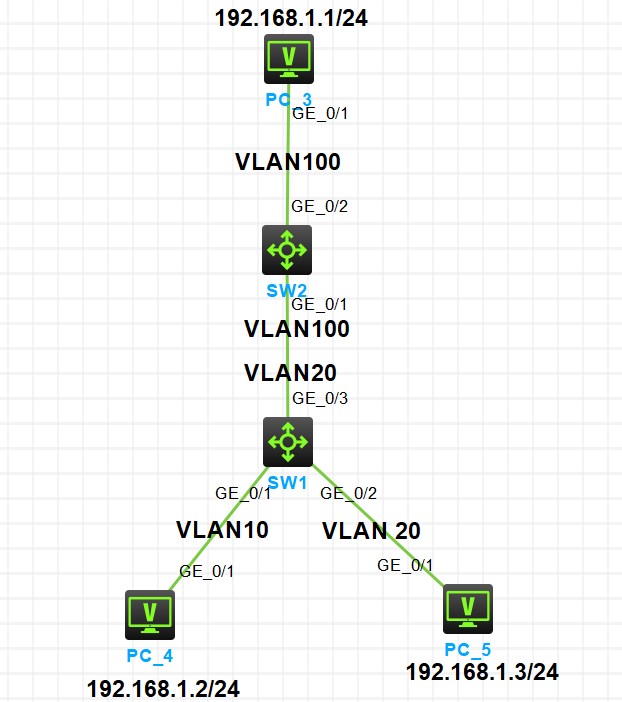
实验拓扑
图1-1
实验需求
I.按照图示配置 IP 地址
II.在 SW1 上配置 Private VLAN,Primary VLAN 为 Vlan30,Secondary VLAN 为 Vlan10 和 Vlan20
III.SW2 通过 Vlan100 下行连接 SW1,要求 PC3 和 PC4 都能以 Vlan100 访问 PC5
实验解法
I.配置 IP 地址部分略
II.在 SW1 上配置 Private VLAN,Primary VLAN 为 Vlan30,Secondary VLAN 为 Vlan10 和 Vlan20
分析:根据需求,通过配置 Private VLAN 来使 Secondary VLAN 对上行设备不可见,实现 VLAN 复用的效果
VLAN30 为 Prmary VLAN,Vlan10 和 Vlan20 为其 Secondary VLAN,把连接上行设备的接口 G1/0/3 口配置为上行接口,连接终端的 G1/0/1 和 G1/0/2 口配置为客户端接口
步骤 1:在 SW1 上创建 Vlan10,Vlan20,Vlan30
1 | [SW1]vlan 10 |
步骤 2:在 SW1 上配置 Vlan30 为 Prmary VLAN,Secondary VLAN 为 Vlan10 和 Vlan20
1 | [SW1-vlan30]private-vlan primary |
步骤 3:在 SW1 上配置 G1/0/3 口为上行接口,G1/0/1 和 G1/0/2 口为下行接口,并把 G1/0/1 口加入 Vlan10,把 G1/0/2 口加入 Vlan20
1 | [SW1-GigabitEthernet1/0/3]port private-vlan 30 promiscuous |
III.SW2 通过 Vlan100 下行连接 SW1,要求 PC3 和 PC4 都能以 Vlan100 访问 PC5
分析:根据 Private VLAN 原理,SW1 向 G1/0/3 接口发出的所有 Vlan 的数据帧都将剥离 tag 发出,SW2 收到的必定是未携带 tag 的数据帧,把 SW2 的 G1/0/2 和 G1/0/2 口都以 Access 类型加入 Vlan100,SW2 就会把收到的 SW1 转发过来的数据帧重新打上 Vlan 100 的 tag,从而实现 PC3 和 PC4 都能够以 Vlan100 访问 PC5
步骤 1:在 SW2 上创建 Vlan100,并把 G1/0/1 和 G1/0/2 口以 Access 类型加入 Vlan100
1 | [SW2]vlan 100 |
效果测试:PC3 和 PC4 都能够 Ping 通 PC5
1 | <PC3>ping 192.168.1.1 |
1 | <PC4>ping 192.168.1.1 |
转载于邓方鸣-在线文档库
转载目的:学习